

What Does Queued Mean in Gmail | How to Fix the Issue?
Has your Gmail gone nuts lately? You are sending emails after emails and nothing is actually sent- is it the case? Are the emails queued up in your outbox? If you are facing these issues with the Gmail app, then you have come to the right place for the solution. In this article, we are going to learn what does queued means in the Gmail application, why is it occurred, and finally how can you fix the problem.
Sometimes we address two or more people in an email, but we should know some basic etiquette on how to address them properly. If you want to know these etiquettes you can also check how to address two people in an email.

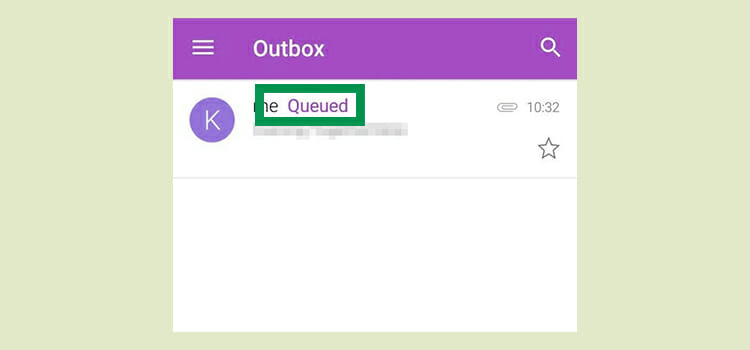
What does Queued Mean in Gmail?
To solve a problem, we need to know the problem inside out, right? For your kind of information, queued in Gmail means pilling up e-mails in the outbox section of your app. In easy words, when any email is failed to sent then the emails stored in a waiting list and that is Queued. Which mails are stored automatically on the outbox section? You may know the answer- yes, it is an outbox. So, for various reasons the emails that you composed and then tried to send, were not actually sent and queued up in the outbox section of your Gmail application.
The case can occur on any of the platforms- android, IOS, or Windows smartphones. If you are not careful enough and check the outbox folder of the Gmail app, you won’t even know that the emails were not sent to the intended addresses. This can create a disastrous situation as one of the emails may be for official work or financial information etc.
Why is E-mail Queued up?
There can be a number of reasons or combinations of them which are responsible for occurring queued up of emails in Gmail. However, you also need to be careful about the root cause of the problem. For example- if your Google account is not properly synced or damaged- then the issue is not with the Gmail app and you need to resolve the issue from the very beginning- creating a new Google account or restoring the previous one.
Besides these types of indirect or non-related problems (which are not our focal points), the main causes for queuing up emails in the Gmail app are listed as follows:
1. Internet Connection is off or Slow Net Speed
Have you checked your internet connection? It can be the silliest reason behind the problem. Slow internet speed can also be the cause for not being able to send an email. Check your server before doing anything.
2. Phone memory out of storage
Your phone’s storage space may have run out. Even the few kilobytes that require in handling emails can be the unseen reason in case space was not provided to Gmail. Besides, the app itself has a specific amount of memory storage; if too many emails are stored on the box, the app cannot stand further and refuse to send another mail.
3. Attached a file of more than 25 MB
Gmail allows limited-sized attached files with the email. So, you cannot attach a few megabyte-sized files as it will be a failed attempt and the email will go to the outbox folder. So, when you are attaching files, make sure that it doesn’t cross 25 MB or otherwise it will move to waiting list or queue.
4. Send Emails frequently
Sending too many emails in a short time period is another reason for queuing up mails in Gmail. Wait a few hours. Gmail will automatically send the emails when the period ends.
How to Fix the Issue of Queued in Gmail?

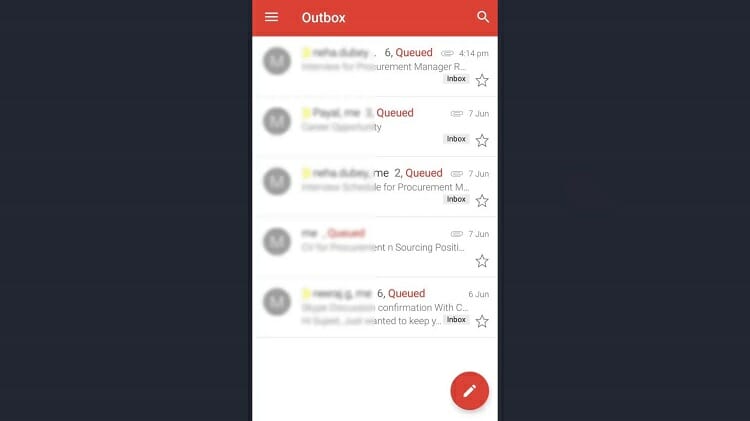
Remember, whenever the cause for the queued in Gmail is dispersed i.e. server is up and running again or storage space is back- then the outbox emails will be sent automatically by the app. However, if you want to fix the issue immediately or the issue persists for a long time, then you need to do something about the issue. Follow these steps for the solution.
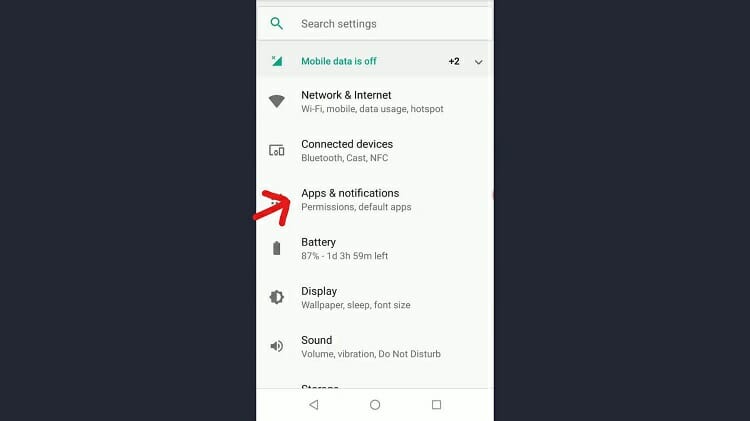
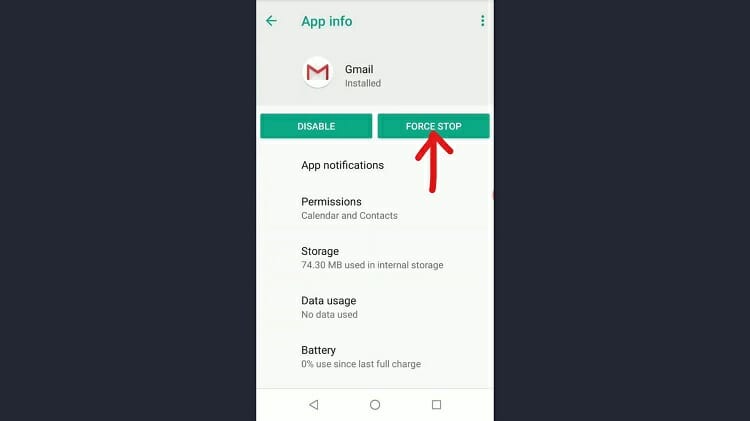
Step 1: Go to Settings on your phone and find the Apps and notifications option.
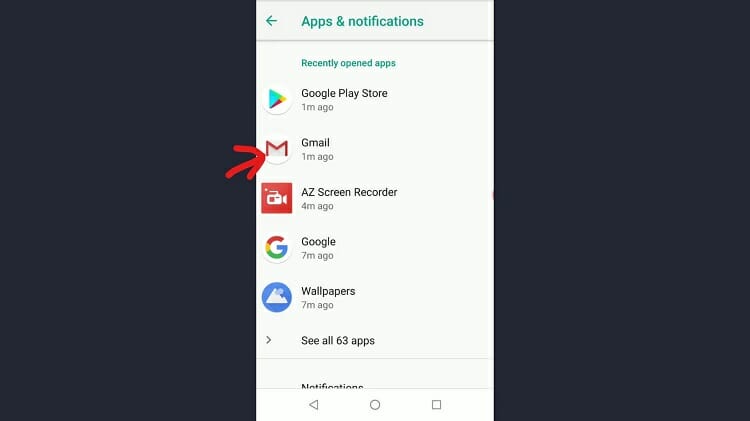
Step 2: You will notice the list of all the apps that are installed on your phone. Find Gmail from there.
Step 3: Click on Force Stop button. Don’t worry; it won’t hurt your Gmail app or the stored emails.
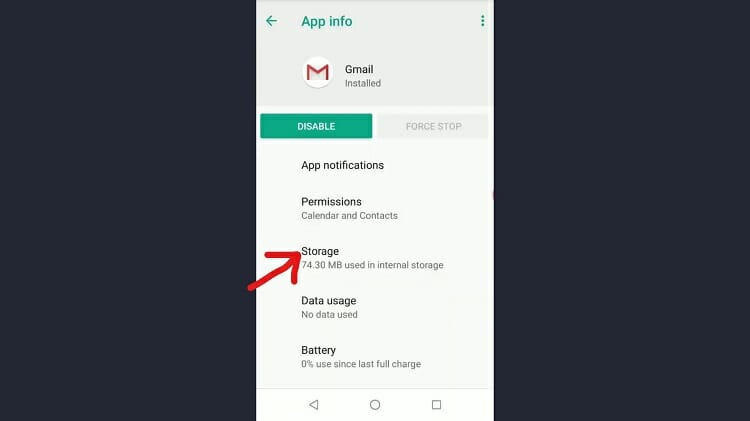
Step 4: Click on the Storage option from that very page.
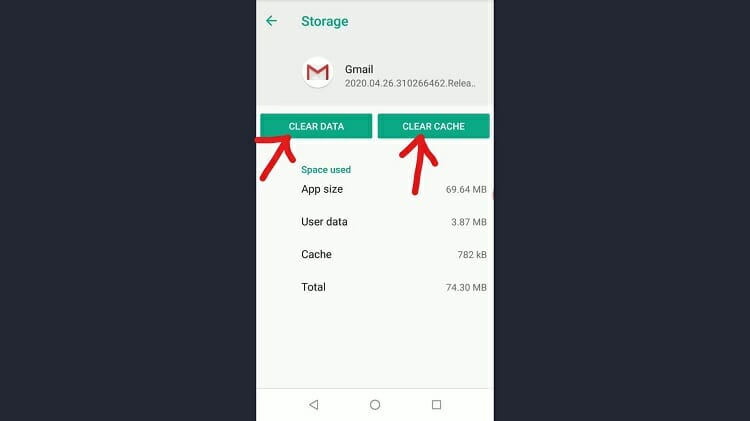
Step 5: Now, you will be directed to the next window where you will see two different options marked Clear Data and Clear Cache. Hit both of the options one after another. This will help in clearing any erroneous files in the Gmail app; hopefully, the issue is fixed.

Frequently Asked Questions
How do I send an email from my outbox?
It’s a very simple task to do. Simply go to outbox and double tap on the email that you want to resend. Then, there you will get the send option, tap on it and the email will be sent out.
Why won’t my email send when stuck in outbox?
If the emails still stuck in the outbox after sending them again then there is issue with your your SMTP server settings.
Conclusion
There are other ways to resolve the issue if it still persists. You can check whether Gmail is allowed or not to run in the background; allow it always. You may also need to fix the Google account, or remove it and add it again; then sync it well with the Gmail app. These measures should be enough to fix queued issues in sending e-mails. Also, note for those who are looking for work in this area, open vacancies work from home email processing can be viewed on the site Jooble.
Subscribe to our newsletter
& plug into
the world of technology


This has actually not been helpful either.
My App got messed up.
I went through all the processes and behold when I revisits the Gmail App on my device, it is as blank as something else. However, it gets on running and booting with the inscription “Getting your messages”.
Could you please reinstall the application and try again? Also, due to bad internet connection, the Gmail app work abnormally. So, check with your internet speed while working with Gmail app. If still you face the issue, let us know.