How to Backup Files on Windows 10 | Easy Steps for Backup
A backup of the entire system is the best strategy against hardware problems, software issues, and malware that can not only damage but also corrupt main files. If you don’t create the backup regularly then you can lose important documents, photos, very important custom configurations, or other things that you may have spent many hours making or setting up by mistakes or online threats like ransomware and malware.
On Windows 10, you can make a backup by using a different method. Also, you can do the system restore for Windows which will help you to get back to the previous stable state if anything goes wrong. You can range files from manually copying files from internal hard drive to external storage, storing files on OneDrive or another cloud service, to using a third-party backup tool. If you don’t want to use a third-party solution, then you can use the Windows default backup system facility.


How to Backup Files on Windows 10
Windows 10’s File History is an easy type of data backup way to create Backup settings and backing up your files. File History takes snapshots of files and stores them on external storage either connected over micro or mini USB or your home connected network. File history creates a library of the past version of documents and you can easily recover if you want. You can also use an external hard drive, backup media, or cloud storage if backing up on the system is inconvenient. We also suggest you archive your data and large important files and store them in a safe storage device.
Windows 10’s File History is an essential part of a file backup strategy, but it’s only one part. You had your files in three places:
a) the existing main working copy on your internal hard drive.
b) a local backup that you can access straight away.
c) a remote backup that keeps your files safe offsite.
If anything, serious accident or other happen to your device then you can reach your files by using the remote backup. The easiest way to take care of or access to the remote backup is to use an online backup storage service.
Back up Files Using File History
Step 1: First of all, click the Start button and go to Settings. A window comes, from the settings window, click on the category for Update & security. Then select the Backup option. On the right side of the window, here comes the title Back up using History. Under the title, click on the link to ‘Add a drive’.
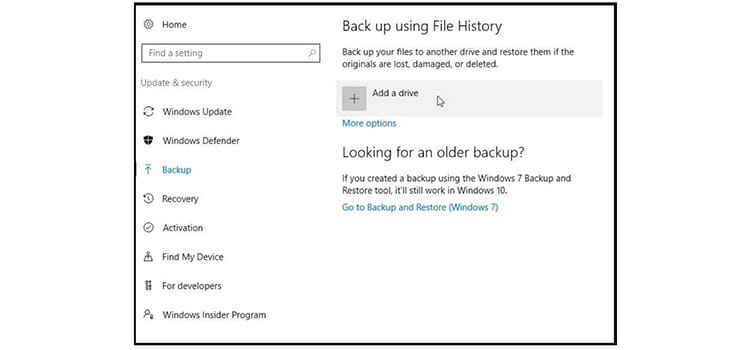
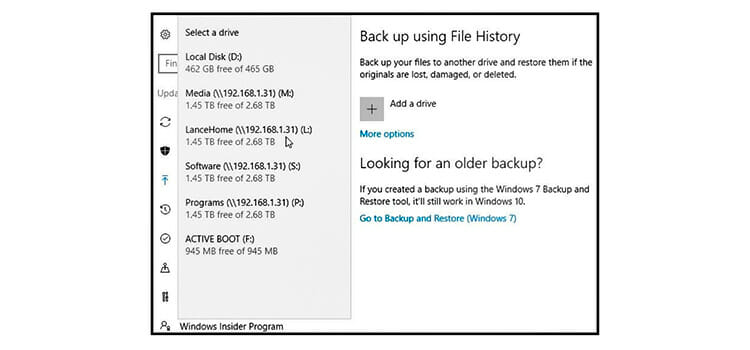
Step 2: make sure you have connected your workable external backup device. a windows display will come with a list of all such locales. Select the location you wish to use for your backups.
Step 3: file history is now enabled to backup any files. Click on the link for ‘more options.
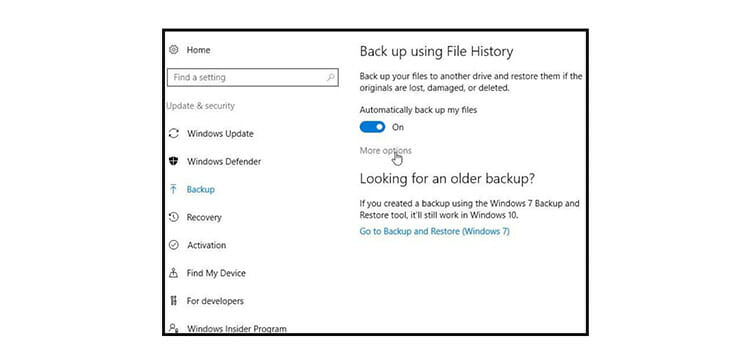
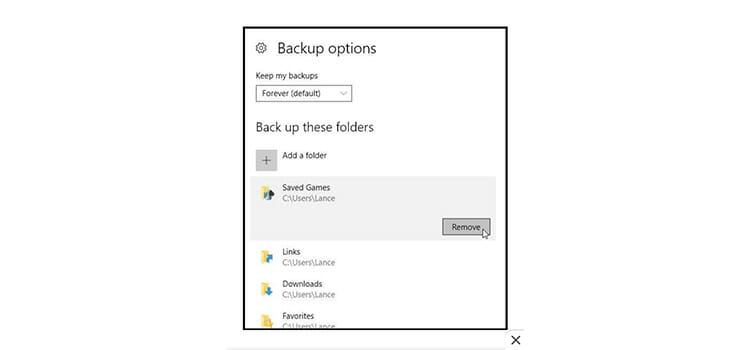
Step 4: backup options window will come. Scroll down the backup options window. You will find a list of default folders that already included in the backup. You can remove any folder, for this select any folder that you don’t want to backup and click the remove
Also, you can add a folder that is not included on the backup list that you wish to add. For this, scroll back up to the top of the window. Select add a folder button. You can select folders from file explorer.
Step 5: At the top of the file history window, click on the drop-down menu and select ‘back up my files’ option and choose how frequently you want to back up your files, options included from every 10 minutes to daily. Below that click on the drop-down menu for ‘keep my backups’. Select how long you want to retain your backup files, anything from ‘until space is needed’ to ‘forever’. After selecting the options as you want click on the ‘back up now’ button. Windows now start backing up the files according to your backup settings.
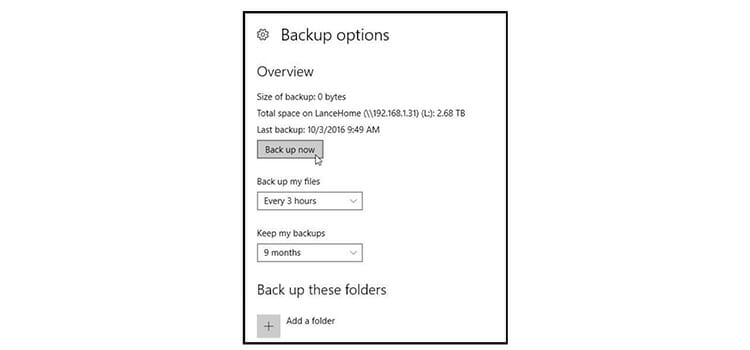
Step 6: After your backup has finished, windows displays the total size of the backup, total space on lance home, last backup information.
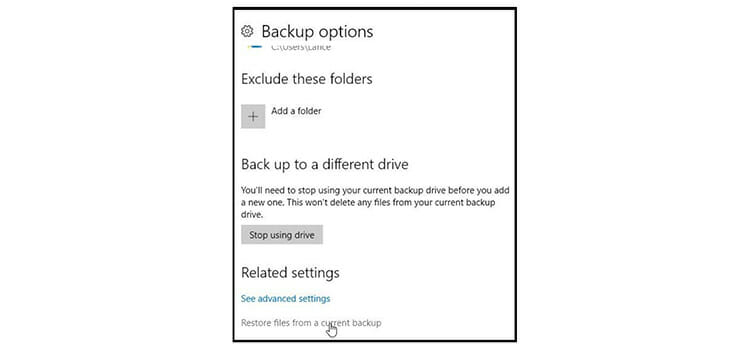
Step 7: imaging, the important file you need is missing in action or has turned into a corrupted mass that you can’t open or read. Luckily it was included in your file history backup. Scroll down to the bottom of the file history window and you will find ‘restore files from a current backup’ option link. Click this button.
Step 8 (Restore): windows display all of the folders that have been blocked up via file history page by page. You may need to go to the previous page or window to find the file you are looking for. When you find a page that you are looking for and that may contain the file you want, double click on this folder. If you want to see the file, you can double click on it to view it, assuming it’s a viewable file. If you want to restore the file, click on the green button with the white arrow at the bottom of the window to restore it.
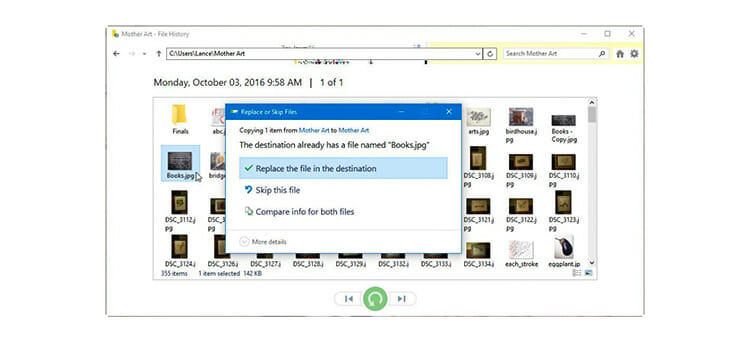
If the file still exists in its original file location, widows ask to replace the file in the destination, skip this file, compare info for both files. If the original file is gone, windows automatically restore it to its previous location.

Backup With System Image Tool on Windows 10
A system image is another way to back up your files safely. It’s a way to say ‘fully backup’ as it’s a copy of everything stored on your computer including settings, apps, personal files, and your windows 10 installation. You can restore your entire storage system from hardware or software problems using the same or different drive very quickly and easily.
This backup tool allows you to save a backup in a different location, such as on a secondary hard drive or a network folder. It’s recommended you use extra removal storage, which you can easily connect or disconnect and store in a safe location.
To back up files by using system image tool, please refer the following steps:
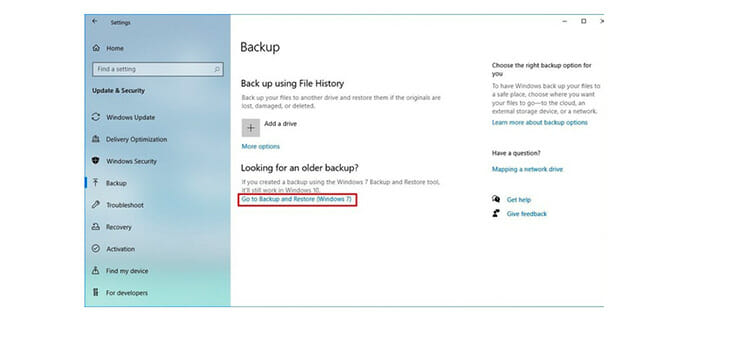
Step 1: First of all, click the Start button and go to Settings. A window pumpedcomes, from settings window click on the category for Update & security. Then select the Backup option. On the right side of the window, here comes the title ‘looking for an older backup?’. Under this title, click the ‘go-to backup and restore (windows 7)’ option.
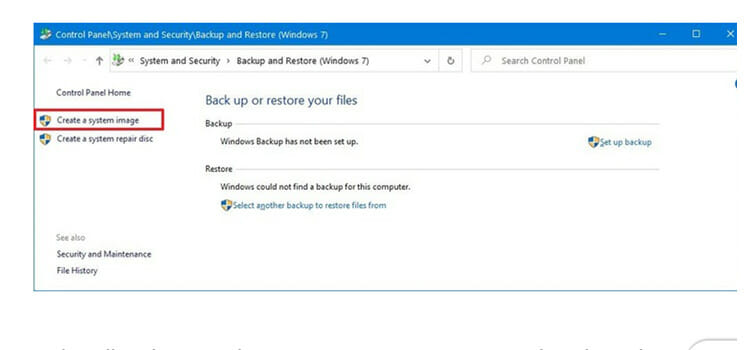
Step 2: on the left side of the window, click the create a system image option.
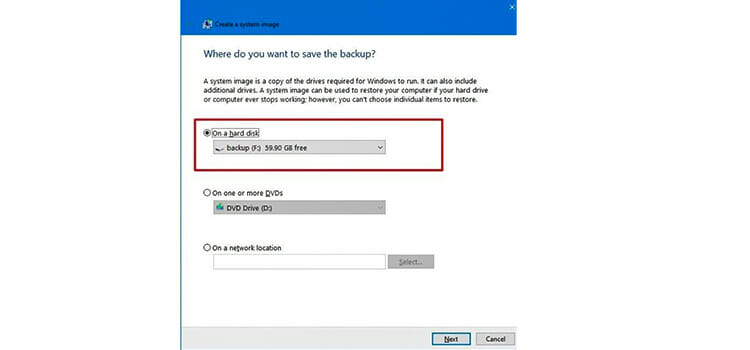
Step 3: a new window comes. Under ‘where do you want to save the backup?’ select the on a hard disk option. By using the ‘on a hard disk’ drop-down menu, select the exact storage location where you want to save the full backup of windows 10. Click the next button.
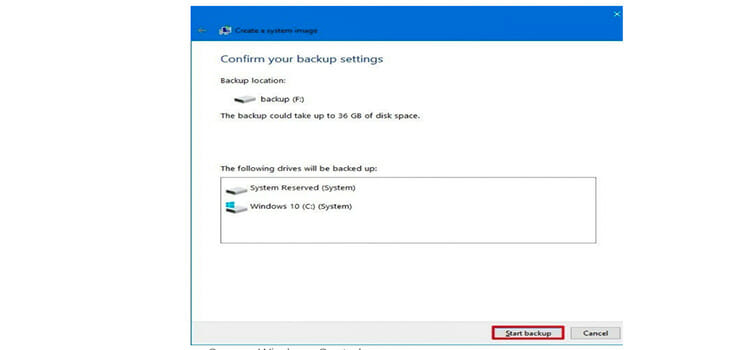
Step 4: under ‘confirm your backup settings’ you can find storage information. If everything perfect, click the Start backup button.
Step 5: click the no button.
Note: after the process, you will see an option to create a system repair disc. But because most devices no longer include an optical disk drive, you can skip the option.
Step 6: click the close button.
Once you complete the steps, the tool system will create a backup of your storage, including almost everything on the main hard drive as well as system reserved partition and additional drives that you may have selected. The system image backup tool uses the ‘shadow copy’ technology that allows backing up files while they are open. System image backup tool recommended taking backup regularly in the event or files that you need to recover from software or hardware failure, malware, ransomware, or another unwanted problem.
Conclusion
The backup is crucial to safeguard your installation and important files. Windows provides you multiple ways to back up your files. To prevent files from unwanted hardware failure or other damage. If anyone wants to keep an up to date back up of files, windows 10 allows doing that. For this, you should be using the system image tool in combination with file history or drive settings.
Subscribe to our newsletter
& plug into
the world of technology