Downgrade Windows 7 64-Bit to 32-Bit | Can I Switch?
Is it possible to downgrade from Windows 7 64-bit to 32-bit?
The answer is – “No”. Normally, you can’t roll back to 32-bit from 64-bit. You need to format your 64-bit windows and freshly reinstall the 32-bit on your computer.
But if you are still finding a way to downgrade your Windows 7 64-bit to 32-bit somehow, then you are just in the right place. We have provided a trick in this article that can help you downgrade your Windows 7 to 32-bit. So, let’s see how is it.


How to Downgrade Windows 7 64-Bit to 32-Bit?
As you already know that you need to perform a clean install of 32-bit to downgrade your windows 7. But using a technique, you can retrieve your data and apps from your previous 64-bit window to the newly installed 32-bit window. You can do it within 3 steps:
- Backing up your windows activation key.
- Reinstall windows
- Reactivate your new version of your windows
But before that, you have to move your important data from the C drive or the drive where your Windows is installed to your local drive or USB drive. You are suggested to ensure that your C drive has at least 15GB of empty space.
Now, let’s dive into the downgrading process.
Step-1: Backup Windows Activision Data
By following the process, you can reactive your system without the product key from your COA (Certificate of Authenticity) sticker. You can perform this backup process with different methods. Both are described here.
Method-1: Using ABR (Activation Backup and Restore) app
- First, download ABR Beta, and install it by clicking the ABRbeta.exe file.
- It will create a folder named ABR. Go to that folder and run activision_backup.exe.
- It will create two files named “backup-cert.xrm-ms” and “backup-key.txt” in the ABR folder.

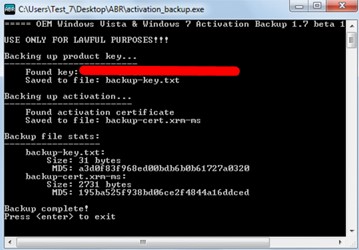
Note: Don’t worry if the product key doesn’t match your Windows CD.
- Now, copy the ABR folder and the ABR installation file to a USB flash drive so that you can use it after reinstallation.
Method-2: Using Advanced Tokens Manager
- At first, download Advanced Tokens Manager and extract it.
- Then, run the app and click Activation Backup and then accept the warning.

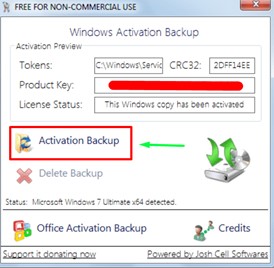
- After receiving the message that the backup is successful, copy the Advanced Tokens Manager folder to a USB flash drive so you can use it after windows reinstallation.
Now let’s start the second step.
Step-2: Install Windows 7 32-Bit
Follow the instruction below step by step to downgrade your Windows 7 64-bit to 32-bit.
- First, insert the windows 7 installation drive. If Autoplay doesn’t appear on your screen, then open the drive and run Setup.exe.
- Then, click “Install Now” and in the next following screen, click “Go online to get the latest updates for installation”.
- If the installation disk contains multiple versions of windows 7, then it will ask you to select your preferred version. You are strongly recommended to choose the version that you had previously on your 64-bit windows.


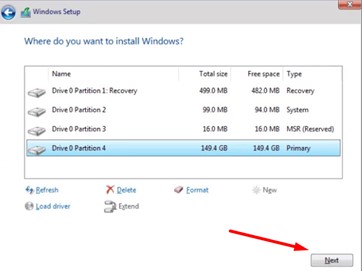
- Next, select “Custom (advanced)” on the following screen and choose the drive where you previously installed your windows 7 64-bit. Generally, it is marked as primary.
- Don’t format it and click next. It will keep the previous version files in a folder named “Windows.old”. You will need this folder in step 3. If you don’t have enough space, you need to free up disk space by about 15GB.

- Click “OK” on the following message box.


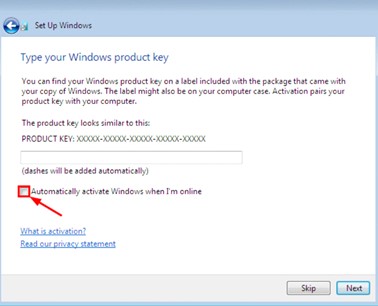
- Now, follow the further installation process by setting up your language and other settings, fill the check box saying “Automatically activate Windows when I’m online” and click “Next”.

After successfully installing the Windows 7 32-bit on your computer, follow the final step to restore your data from 64-bit to 32-bit.
Step-3: Restore Windows Activation
You will have 30 days left on your hand to re-activate your windows 7 32-bit version. Now, let’s restore the product key.
Method-1: Restore From ABR
Insert the flash drive where you copied the ABR folder in step 1 and run “activation_restore.exe”. It will automatically restore the product key and information to activate your Windows 7.
Method-2: Restore From Advanced Tokens Manager
Advanced Token Manager requires .NET Framework which isn’t available on a clean installed Windows 7. So, download and install .NET Framework first.
Then move the previously copied folder to your computer and run Advanced Tokens Manager.exe. It will “backup found”. Click Activation Restore and accept the notice. Finally, you should get a success message and your Windows 7 32-bit will be activated successfully.
Now, you have to reinstall all the apps that you are using in the 64-bit version of your Windows 7. You can merge the previously copied data if needed.
Frequently Asked Questions
Can I Downgrade 64-Bit to 32-Bit?
No, you cannot downgrade to 32-bit from 64-bit while keeping the installed software. You need to perform a clean reinstall to downgrade from 64-bit to 32-bit.
Can I Run 32-Bit Program On 64-Bit Operating System?
Yes, you can run most 32-bit programs on a 64-bit operating system. However, some antiviruses and drivers that are made only for the 32-bit system, will not run on a 64-bit system. But you cannot run any 64-bit programs on a 32-bit operating system.
Can I Install Windows 7 32-Bit on 64-Bit?
Yes, you can install Windows 7 32-bit on a 64-bit processor. But it doesn’t mean that the capability of your processor will be maximized after this. You will face no complications from using a 32-bit operating system on a 64-bit processor.
Is It Possible to Install Windows 7 64-Bit on a 32-Bit Processor?
No. Your 32-bit processor is unable to run any 64-bit operating system. It will only run a 32-bit operating system. So, it is impossible to install Windows 7 64-bit on a 32-bit processor.
How Do I Downgrade Windows 7 64-Bit to 32-Bit Without Reinstalling?
No, there is no way to change the 64-bit version to the 32-bit version of Windows without a clean installation process. The kernel level of these two versions is completely different from each other and you cannot downgrade it without reinstalling your OS.
Conclusion
Although Microsoft ended its support for Windows 7 on January 14, 2020, you still can use the OS on your computer. But there is no other way to downgrade your OS without re-installation.
Your Windows 7 will not activate with the same product key if you downgrade from 64-bit to 32-bit even after a clean installation. But you can follow the above method to downgrade your Windows 7 64-bit to 32-bit and reactivate it with the same information.
Subscribe to our newsletter
& plug into
the world of technology