[Fixed] We Can’t Activate Windows on This Device
Most of the time, people get the message, “we can’t activate Windows on this device,” after a recent hardware change. Other times, the message may appear out of nowhere.
Aside from hardware changes, improper Windows versions or product keys too can cause this.
Whatever it may be, it can be quite annoying, to say the least. Continue reading below to find out more about why it might happen and how to get rid of it. Depending on your situation, solutions can vary from applying the product key again to reinstalling Windows. Let’s begin.
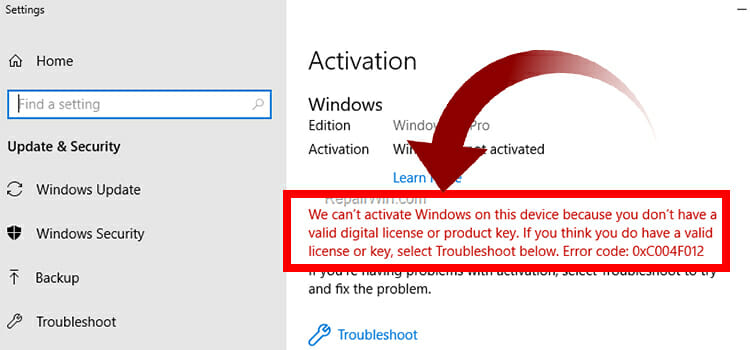
We Can’t Activate Windows on This Device: When Does it Happen
This message can be triggered for several reasons. They are:
Invalid Product Key
When you are trying to activate Windows by using an invalid Windows Product key, you may encounter this error. Also, you could encounter this error message while your windows product key is assigned for a different version of Windows (For example, using the product key of Windows 8 in Windows 10). It is also possible to encounter this issue while you have used your Windows product key on multiple devices. If that’s the, case the Windows Product key isn’t valid anymore for activating Windows, and you need to use a different product key to activate Windows.
Major Hardware Change
A significant hardware change in your device could lead you to encounter an activation failure issue.
If so, you need to run the Windows Activation Troubleshooter and re-enter the Windows product key to resolve the issue.
OEM Version
The Windows OEM version is a system builder, which is primarily used in new build devices by the manufacturers. This version of Windows is much cheaper and is always tied to a single device forever. Changing to the retail version of Windows could be a solution to resolve the issue. You can reinstall the Windows version of your device to change it to the retailed version.
Faulty Drivers and System Files
Corrupted and faulty System drivers and files could also trigger the activation failure issue on your device. Even you cannot be able to activate Windows with a valid product key. If so, you need to check the system files and the drivers to check if there is any issue lying in there. Running the System File Checker could help you to resolve these system issues.
How to Fix We Can’t Activate Windows on This Device
Follow these methods to fix the Windows activation error message.
Check the Validity of Windows Product Key
Make sure that you are using a valid Windows product key while activating the Windows with a product key. You can use a third-party product key validator to check if the product key you are using is valid or not.
Step-1; Download and Install the Microsoft PID Checker on your device,open it Afterward, Afterward, open the PID Checker application on your device.
Step-2; Type your Windows product key on the Product Key box and Select the Software Package, then click on Check.
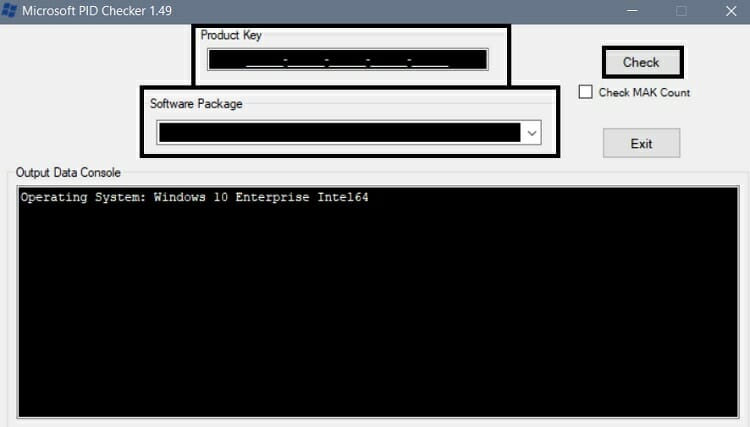
You need to change the Windows product key if you are using an invalid Windows product key to activate the Windows.
2. Checking the OEM Version of Windows
OEM or Original Equipment Manufacturer is a version of Windows that is developed by Microsoft for the computer manufacturer company to use as the preinstalled operating system in computers. Though this is a genuine version of Windows, it is made for locked to a computer system. If you are using an OEM version of Windows, you can’t activate it.
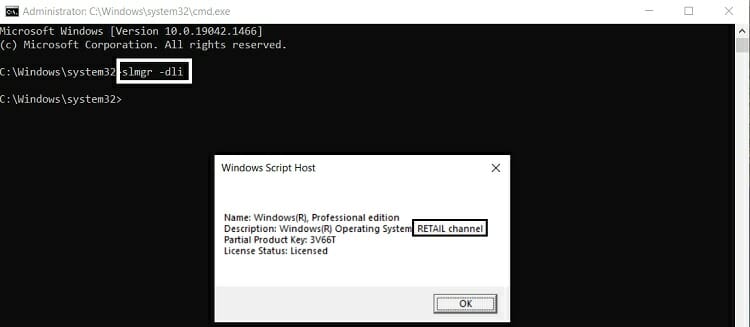
You can check your Windows version (Retail, OEM or Volume) by following these steps;
Step-1; Press Windows + R key to open the Run Dialog Box in your device, type cmd, and press ctrl + shift + enter to open Command Prompt with administrator privilege.
Step-2; Type slmgr –dli on the command prompt screen and press enter. The return message will tell you if you are using an OEM version or not.
3. Reactivate Windows Using Product Key
After checking the product validation key and OEM channel, try to reactivate the Windows with the valid product key. If the valid product key still doesn’t activate the Windows, you have to execute the System File Checker command to check and repair the system files and the drivers.
You can follow these steps to reactivate Windows by using the product key;
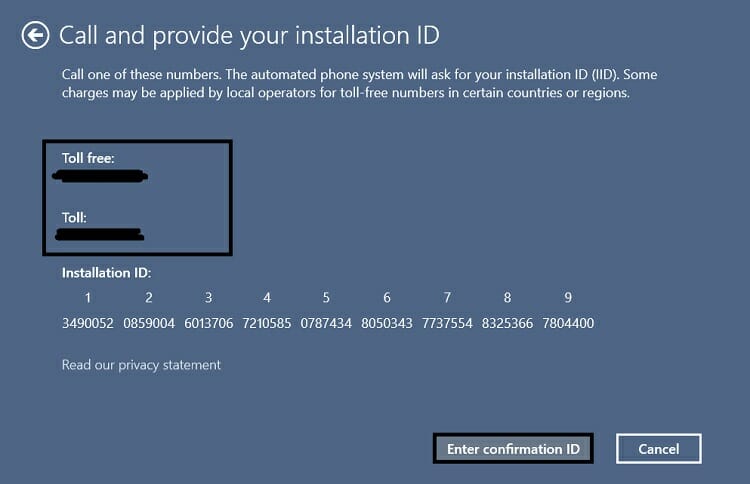
Step-1; Press Windows + R key to open the Run Dialog Box in your device, type slui 4, and press the enter key to start the reactivation process.
Step-2; Select your country or region and click on Next. Afterward, you can see 2 phone numbers call one, and click Enter Confirmation ID. Microsoft will let you know about the confirmation ID while you call one of these numbers. Enter the provided confirmation ID and click on Activate Windows to reactivate your Windows.
4. Run the SFC Scan
The System File Checker detects the corrupted and faulty system files and drivers and applies fixes to them. In some cases, corrupted system files and faulty drivers don’t allow activating the Windows. That’s why you need to check the system files and the driver by executing the SFC through the Windows Command Prompt.
To run the SFC scan, you can follow these steps;
Step-1; Press Windows + R key to open the Run Dialog Box in your device, type cmd, and press ctrl + shift + enter to open Command Prompt with administrator privilege.
Step-2; Type and execute sfc/scannow command Afterward, you will know about the condition of your device system files.
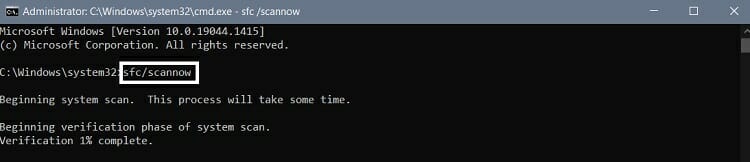
If you find any issues with the system files and drivers of your device, you need to fix them first and then start the activation process of Windows.
5. Reactivate Windows Using PowerShell/Command Prompt
To activate Windows by using Windows PowerShell, you need to follow these steps;
Step-1; Press Windows + R key to open the Run Dialog Box in your device, type PowerShell, and press ctrl + shift + enter to open the Windows PowerShell with administrator privilege.
Step-2; On the Windows PowerShell prompt, type slmgr.vbs –ipk xxxxx-xxxxx-xxxxx-xxxxx-xxxxx (Here, xxxxx-xxxxx-xxxxx-xxxxx-xxxxx represents the Windows product key) and press enter.

Step-3; Once the process is completed, type slmgr.vbs/ato on the Windows PowerShell prompt and press enter. Wait till the activation process is completed. Reboot your device afterward.

Follow these steps for activating the Windows through the Windows Command Prompt;
For Command Prompt
Step-1; Press Windows + R key to open the Run Dialog Box in your device, type cmd, and press ctrl + shift + enter to open Command Prompt with administrator privilege.
Step-2; On the Windows Command prompt, type slmgr.vbs –ipk xxxxx-xxxxx-xxxxx-xxxxx-xxxxx (Here, xxxxx-xxxxx-xxxxx-xxxxx-xxxxx represents the Windows product key) and press enter to execute the command.

Step-3; Once the process is completed, type slmgr.vbs/ato on the Windows Command prompt and press enter to execute the command. Wait till the activation process is completed. Reboot your device afterward.

If you still encounter the product activation failing issue, run the activation troubleshooter to fix the issue.
6. Activation Troubleshooter
The Windows have preinstalled troubleshooter to troubleshoot the activation issues. The activation troubleshooter could help you to fix any activation issues, including the activation failure issue.
You have to follow these steps to run the Windows activation troubleshooter;
Step-1; Press Windows + I key to open the Windows Settings and navigate through Update & Security > Activation.
Step-2; Locate and click on the Troubleshoot, from the right pane of the Activation window. Click on the I changed hardware on this device recently link. Afterward, you have to click on the name of your device from the device list. If you don’t find your device name on the linked devices list, click on See other devices and select The device I’m using right now to start activation troubleshooting.
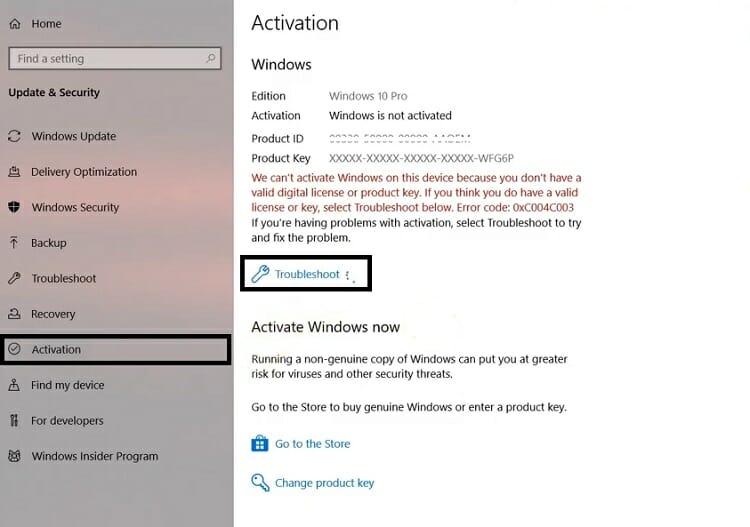
Once the activation troubleshooting process is completed, try to activate the Windows again to see if the issue is fixed now.
7. Reinstall Windows
When everything fails, consider reinstalling the windows. And afterward, apply the product key again.
8. Contact Microsoft Customer Support
When everything fails but you are certain of the authenticity of your windows copy, consider contacting customer support. They might be able to help you solve the issue.
Frequently Asked Questions (FAQs)
How Long a Windows Product Key Is Valid for?
Microsoft offers a lifetime validation for any product key, which means you can use the Windows product key anytime, but Microsoft never allows the same product key on multiple devices.
What Will Happen if I Use a Windows That Is Not Activated?
When you use non-activated Windows, you won’t be able to access any personalization settings of Windows, and you can notice a watermark in the bottom right corner. You cannot remove the watermark until you activate the Windows.
Wrapping Up
Now, you know about the reactivation process of windows and the fixing methods of windows activation issues. For keeping the validity of the Windows product key, never try to use the Windows product activation key on multiple devices at the same time.
If you have any questions, consider leaving a comment.
Subscribe to our newsletter
& plug into
the world of technology