[Fix] The Winlogon Notification Subscriber Was Unavailable to Handle a Notification Event (100% Working)
Try creating a new administrator profile and replacing the old one since this problem only occurs on one administrator account. Check for faulty line/switch ports by swapping network ports and use an elevated command prompt to run and navigate to the proper script to resolve the issue.
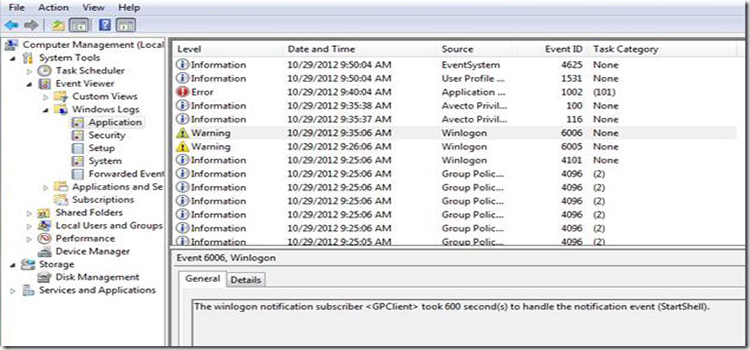
The Winlogon Notification Subscriber <Gpclient> Was Unavailable to Handle a Notification Event
The error message ‘The Winlogon Notification Subscriber <Gpclient> Was Unavailable to Handle a Notification Event’ generally pops up when domain controller when an administrator tries logging into the domain controller. It usually takes around 10 minutes for the administrator profile to fully load and show a blue screen in the meantime.
Some patterns that follow the issue such as symptoms that tend to arise when the computer is switched off in an unusual manner. The issue arises randomly after months of the system working without symptoms. Also, the higher demand computers get affected quicker.
Winlogon Notification Subscriber <Gpclient> Error Causes
There might be several reasons behind the issue, such as an unusual administrator profile. It can be caused by a login script running as a user configuration at logon.
Or the reason may be attempting to run a batch file to copy a directory from the network to the local C: the command, requesting user interaction to determine if the file path was a file or directory. A GPO or Script within a GPO may cause an issue, resulting in the error.
Winlogon Notification Subscriber <Gpclient> Error Solutions
Use any of the following methods to resolve the issue:
- One of the best solutions in this regard is to date has been to image the computer again. Rejoin the computer back into the domain after removing it.
- You may need to consider creating a new user account to replace the old one since this issue only occurs on one administrator account. Remove the faulty account after making sure everything works fine.
- Check for faulty line/switch ports by swapping network ports between symptomatic and non-symptomatic computers.
- Try to eliminate what GPOs are applying to the computer account. After that troubleshoot the user account. You can also use gpresult to compare results from accounts that log in properly with another one that does not.
- If the problem ends up with a new ‘Took 605 seconds to handle the notification event’error, use the following script file and copy it into a winlogin.bat file. After that, open an elevated command prompt and run navigate to the script to run it.
| @Echo offIf EXIST “c:\Wbem.txt” GOTO END :BEGINEcho.Checking following services…Echo IPHelper (iphlpsvc)Echo SMS Agent Host (CcmExec)Echo Security Centre (wscsvc) Echo Windows Management Instrumentation (winmgmt)Echo. Set Service1=”ccmexec”Set Service2=”iphlpsvc” Set Service3=”wscsvc” Set Service4=”winmgmt” :CHECKfor /F “tokens=3 delims=: ” %%H in (‘sc query %Service1% ^| findstr ” STATE”‘) do ( Set Service1State=%%H if /I “%%H” NEQ “STOPPED” ( echo.%Service1% still STOP_PENDING. Press Any key to check again otherwise Ctrl C out of the script net stop %Service1% timeout 10 cls GOTO Check ) )for /F “tokens=3 delims=: ” %%H in (‘sc query %Service2% ^| findstr ” STATE”‘) do ( Set Service2State=%%H if /I “%%H” NEQ “STOPPED” ( echo.%Service2% still STOP_PENDING. Press Any key to check again otherwise Ctrl C out of the script net stop %Service2% timeout 10 cls GOTO Check ) )for /F “tokens=3 delims=: ” %%H in (‘sc query %Service3% ^| findstr ” STATE”‘) do ( Set Service3State=%%H if /I “%%H” NEQ “STOPPED” ( echo.%Service3% still STOP_PENDING. Press Any key to check again otherwise Ctrl C out of the script net stop %Service3% timeout 10 cls GOTO Check ) )for /F “tokens=3 delims=: ” %%H in (‘sc query %Service4% ^| findstr ” STATE”‘) do ( Set Service4State=%%H if /I “%%H” NEQ “STOPPED” ( echo.%Service4% still STOP_PENDING. Press Any key to check again otherwise Ctrl C out of the script net stop %Service4% timeout 10 cls GOTO Check ) ) :STATUSCLSEcho.%Service1% is %Service1State%Echo.%Service2% is %Service2State%Echo.%Service3% is %Service3State%Echo.%Service4% is %Service4State%echo.echo.All Services Stopped… Please Wait… Repairing WBEM Repositorydel C:\Windows\System32\wbem\Repository\*.* /qrd C:\Windows\System32\wbem\Repository* /qtimeout 5clsecho.Fix complete. Your computer will Restart in 60 seconds.shutdown -r -t 60echo.WBEM Script Control > c:\WBEM.txttimeout 60 :END |
- Disable “Run logon scripts synchronously” under Computer Configuration\Policies\Administrative Templates\System\Scripts
- Open Group Policy Editor
Start\Run\gpedit.msc
Computer Configuration\Administrative Templates\System\Scripts
Set the settings to the following: Specify maximum wait time for Group Policy scripts: Enabled (Options: Seconds, 60)
Run logon scripts synchronously: Disabled
To Conclude
All systems and services should operate normally without no more login delays. The unusual 6-10 minute delay will reduce down to less than one minute and be ready to go. If the issue persists, contact tech support for further assistance.
Subscribe to our newsletter
& plug into
the world of technology