What is Data Execution Prevention in Windows?
Data Execution Prevention or DEP is a technology that comes prebuilt with Windows that protects your computer from executables (.exe files) being launched from unauthorized places.
If you are still wondering what is Data Execution Prevention in Windows, let us simplify this for you. Data Execution Prevention prevents malicious codes from running on your computer.
Continue reading below to find out more about how DEP works and how to turn it on or off. Let’s begin.
How Does Data Execution Prevention Work?
There is a reserved memory region in our operating system where critical programs and functions run. This space is limited. If a code is not written correctly or harmful to your device, it will consume considerable space. In addition, it will lead you to a buffer overflow situation which can give access to the critical data to that virus or malicious program.
That is where DEP steps in. It counters such access or execution by any executable programs that aren’t allowed to run in the system. It raises an exception when it detects suspicious code loading and stops it from opening.
DEP works in two methods-
Hardware-Enforced DEP: It sends instructions to the CPU to mark some programs as non-executable. It inserts a bit in the page table entry, which prevents the system from executing those codes.
Software-Enforced DEP: First, the operating system must support this type of DEP. Then it only prevents the device from user-mode processes. It does not control the system from executing a malicious code; instead, it protects you from another type of threat called Security Exception Handling (SEH) overwrite.
How To Check Data Execution Prevention?
To check the status of your DEP, follow these simple steps:
Open Control Panel and go to System and Security.

Go to System.

Type View Advanced System Setting in the search box.

Go to Setting in the Performance section.

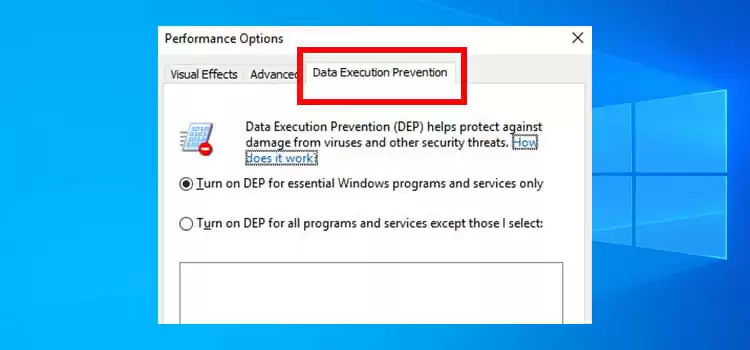
Select Data Execution Prevention.

Here, you see the current DEP status of your system also whether your computer supports hardware-enforced DEP or not.

You can add exceptions to the DEP. To add exceptions, select Turn on DEP for all programs and services except those I select and select Add. Then choose the files you want to exclude and restart your system for the changes to take effect.

How Can I Enable or Disable Data Execution Prevention?
After you have checked the status of your DEP, you can enable or disable DEP. You can disable DEP in Windows 10 to modify some applications to be used in Windows 10. Though I do not recommend you to do so, here’s how to do it-
Select Start and type CMD to open the command prompt menu. Then, choose Run as Administrator and open the command prompt.

Type BCDEDIT /SET {CURRENT} NX ALWAYSOFF in the command prompt window and press Enter. Then restart your device to take effect the change.

Now, to again enable DEP, open the command prompt and type BCDEDIT /SET {CURRENT} NX ALWAYSON and press Enter. Then restart the device.

What Are the Benefits and Disadvantages of Data Execution Prevention?
It prevents your system from executing codes in the memory data pages. Hardware-based DEP detects code running from these locations and makes an exception when such an execution occurs. On the other hand, software-enforced DEP supplements the hardware-enforced DEP by preventing malicious codes from taking advantage of exception-handling mechanisms in Windows.
Frequently Asked Questions and Answers
Is it safe to turn off DEP?
Generally, turning DEP off is neither necessary, nor do we recommend you to do so. However, if a program gets shutting down abruptly because of the DEP and you are sure of its origin, you can shut DEP off.
What is the disadvantage of DEP?
The disadvantage of DEP is that sometimes it can flag older programs, especially for programs that are not made by Microsoft. Also, DEP error can be caused because of some outdated device drivers. In that case, consider disabling DEP.
Conclusion
Though all software and hardware do not fully support it, DEP is a valuable feature. Your computer may sometimes face some issues and errors. But it is among the most basic windows-based system to protect your computer. Therefore, without any unavoidable reason, the DEP must be kept enabled always.
Subscribe to our newsletter
& plug into
the world of technology