How to Change Order of SoundCloud Playlist? 2 Easy Methods
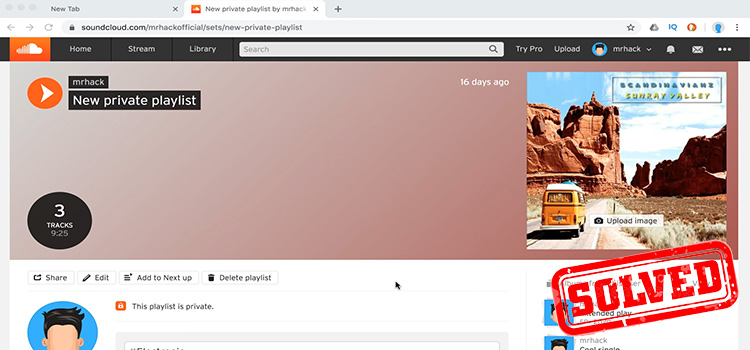
SoundCloud can be an excellent platform to discover and promote music. If you are new to it and struggling with keeping your playlist in your preferred order, we are here to help.So how to change the order of the SoundCloud playlist? You do that by accessing the playlist and clicking on the pencil icon. You can find the pencil icon below the playlist’s banner. On mobile devices, however, it’s as simple as drag and drop from the edit playlist menu.
How Do I Change the Order of my SoundCloud Playlist?
To change the order of SoundCloud follow the methods ‘Edit SoundCloud’ and ‘Delete Playlists’ on SoundCloud.
1. Edit SoundCloud Playlists on Computer
The method of editing SoundCloud is given below:
- Click Collections in the menu across the top, assuming you’re still logged into SoundCloud. Next, select Playlists and then the playlist you want to change by clicking its name.
- To change the playlist’s information, click the pencil symbol located beneath the header.
- To reorder the music in your playlist, click and hold down the mouse button on a track name, then drag it to a new location. To remove a tune from the playlist, click the “X” next to it. To add your audio files—i.e., those for which you have the copyright—from your computer to your playlist, click Add New Tracks.
- You can modify the playlist’s name and Internet address in the “Info” section. You may enter a description for the playlist or choose a picture to represent it with. Additionally, you may decide whether the songs belong to a particular genre or are part of a particular playlist type.
- You can choose to make your playlist “Public” or “Private” under the “Settings” tab. Additionally, you can decide whether to publicly show the code that allows other people to insert a version of your playlist into their website or not.
- Simply follow step 2 in the “How to Create a SoundCloud Playlist” section above to add new music that is currently on SoundCloud to an existing playlist. If you want to create a new playlist, select Create New and continue step 3 in the “How to Create a SoundCloud Playlist” section. However, an option to Add to the Playlist will display in place of Create New. Simply select the playlist you want to add the music to and click the Add to Playlist button next to it.
2. For iOS and Android
In your SoundCloud app, tap on edit playlist from the settings menu. Then simply drag the tracks up or down into the order you want them to be. That’s it.
Delete Playlists on SoundCloud
To delete a SoundCloud playlist:
- Click Collections in the menu across the top, assuming you’re still logged into SoundCloud. After that, select Playlists and then click the playlist’s name to delete it.
- To remove a playlist, click the trash can symbol beneath the playlist heading. If you’re sure you want to remove the playlist, click Delete.
Conclusion
These are the fundamental workings of SoundCloud playlists. By following the procedures stated above, you can easily sort your SoundCloud playlist now. Hopefully, this article was helpful to you.
Subscribe to our newsletter
& plug into
the world of technology