Can I Get Minecraft Windows 10 on Mac? How Can You Play?
Mac OS doesn’t allow other editions of Minecraft except for the Java Edition. Now, if you are playing Java Edition on your Mac, then you cannot play multiplayer with your friend who playing Windows 10 Bedrock edition on his windows OS. So, how you can solve this issue?
Unfortunately, there are no legal ways to of running Minecraft Windows 10 on Mac. But don’t worry, we are here to guide you on how you can get this edition on your Mac in an alternative way.
So, without wasting any more time, let’s dive in.
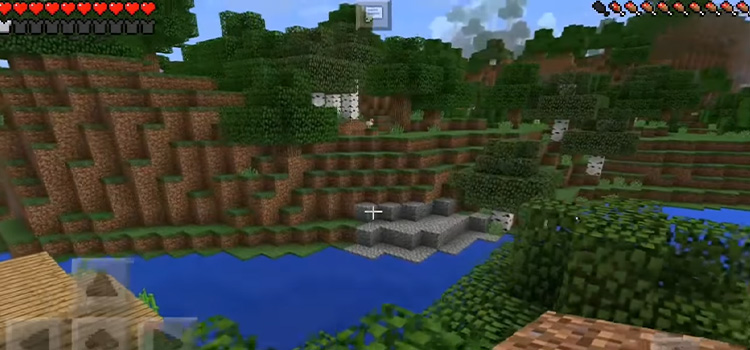
Can I Get Minecraft Windows 10 on Mac?
Windows 10 has the Bedrock Edition and Mac has the Java Edition of Minecraft. Both are different from each other and aren’t compatible with different operating systems.
However, you can play the Windows 10 Edition on your Mac if you are running the Windows OS instead of Mac OS on your Mac. But this is a big compensation for a Mac user to switch to a different OS.
Fortunately, we have found a solution for you. You can play Minecraft Windows 10 Edition on your Mac OS by creating a bootable Windows Minecraft USB drive. If you are not sure about how you can do that, then read the next segment of this article.
What Is a Bootable Windows Minecraft USB Drive and How Does It Work?
To simplify, it is a USB hard drive that has enough space to hold the Windows 10 OS and the Minecraft Windows 10 Edition installed on it including all the associated data of the game. The USB drive must be bootable or it won’t work on a Mac.
You need to migrate Windows 10 to a bootable USB drive and you can play any windows games including Minecraft Windows Edition on a Mac without using any Boot Camp or consuming the hardware resource of a Mac.
Another good news is you will never face the overheating issue with your Mac if you play windows games using a bootable USB device on it. Now let’s see how you can do it.
Upgrade your Mac gaming with our bootable USB drive! No more Boot Camp, overheating, just seamless Windows 10 and Windows games. Get yours now!
How to Create Bootable USB Drive for Playing Minecraft Windows 10 Edition on Mac?
You can use any portable Windows USB creator tool to do it. We are going to show you the process of making a bootable USB drive using the EaseUS OS2Go tool.
Follow the steps below to create a USB device bootable and play Minecraft Windows 10 Edition on Mac:
Step 1: At first install the EaseUS tool on Windows. Then, plug in a USB drive that has sufficient storage to hold the Windows 10 OS and Minecraft.
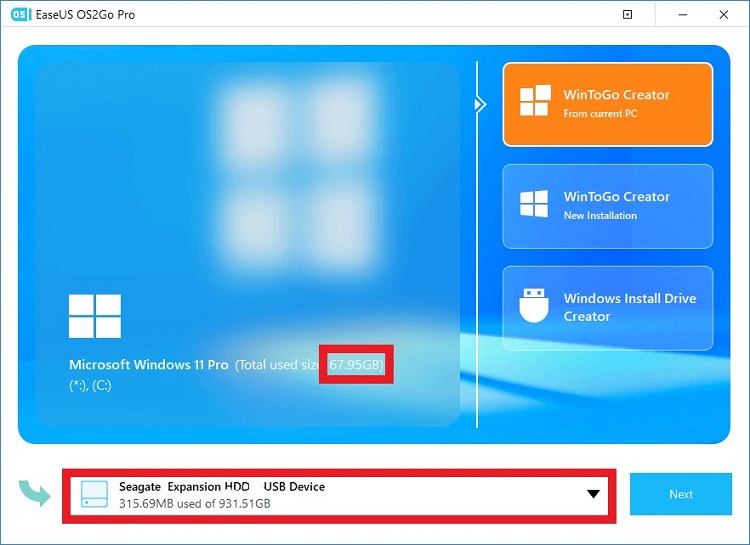
Step 2: Now open the EaseUS app and select the source disk layout (C: drive) USB drive that you want to boot. Click Next to continue.
Note: Make sure that OS and the Minecraft Window Edition are installed on the source drive.
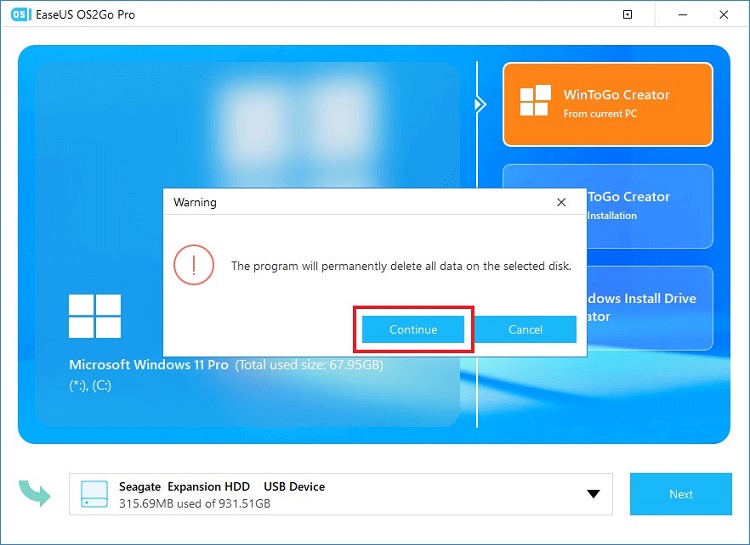
Step 3: You will be notified that all the containing data of that USB drive will be permanently deleted. If you’ve already backed up the drive, then click the Continue button to proceed further.
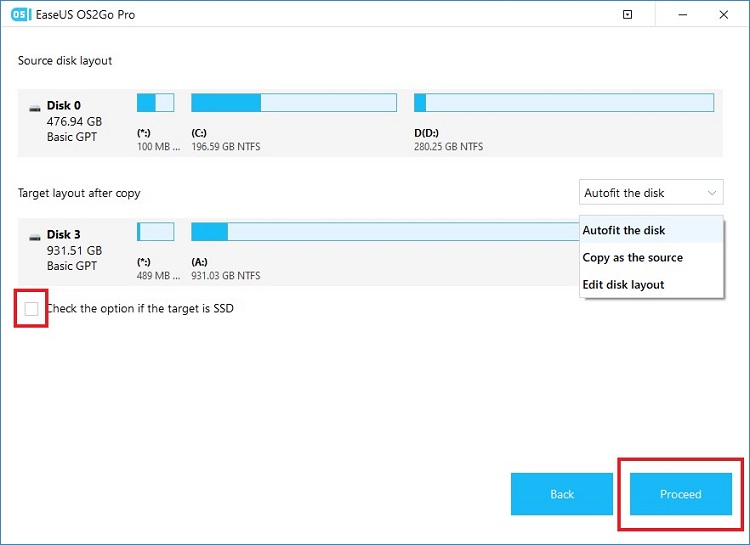
Step 4: Now, keep the disk layout default unless you want to customize the layout according to your need. If the drive is an SSD, then tick the check mark and click Proceed.
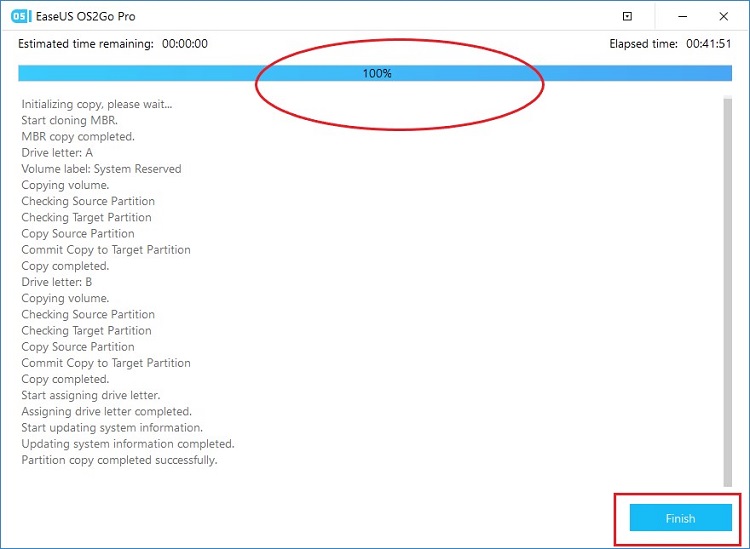
Step 5: It will start to create a USB drive portable. So, wait until the progress reaches 100%. After completing the process, click Finish and your drive is ready to boot on Mac.
Now, let’s see how you can boot the USB drive and play Minecraft Windows 10 edition on Mac.
How to Play Minecraft Windows 10 Edition on Mac?
Once you’ve successfully made your USB drive portable from the above segment, follow the instructions below to get your Mac ready to play Minecraft Windows Edition without changing the Mac OS:
- Turn off your Mac and insert the portable Windows USB into the port.
- Now, turn on the Mac and press the Option/Alt key.
- Then, choose the EFI (Extensible Firmware Interface) Boot that is highlighted with yellow color.
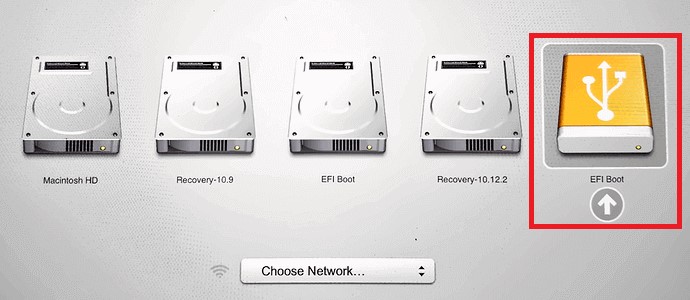
- After that, follow the onscreen instructions to boot your Mac.
After booting successfully, your Mac is ready to play Minecraft Windows 10 Edition. Open the game and start playing.
Frequently Asked Questions (FAQs)
Can I Get Minecraft Windows 10 Edition on Mac?
Minecraft is available for all platforms including Windows OS, macOS, Android, and iOS. However, each of them isn’t compatible on a different platform. But as there is the option to install Windows OS on Mac, you can play Minecraft Windows Edition on a Mac that is running the Windows OS.
How Do I Get Windows Minecraft on a Mac?
You can play Minecraft Windows Edition on a Mac only if it is running the Windows OS. You can either install Windows OS on the Mac with the help of Boot Camp, or you can create a bootable USB drive where the Windows OS and Minecraft Windows edition is preinstalled and boot it on your Mac.
Can I Get Minecraft PC on Mac?
Minecraft PC version has two editions. One is Bedrock Edition which is compatible with Windows OS only. Another one is the Java Edition which is only compatible with the macOS. You can easily get Minecraft on your Mac from the Apple Store.
Can I Run Minecraft Bedrock Edition on Mac?
Minecraft Bedrock Edition is only for Windows OS. However, new Macs such as MacBook Air, Pro, or Mini equipped with the new Apple M1 ARM processor can run the Bedrock Edition on macOS. But the vast majority of Mac users can run the Java Edition only.
However, you can run Minecraft Bedrock on your Mac using a trick that is mentioned above in this article.
What Version of Minecraft Is on Mac?
The “Minecraft: Java Edition” is only available for macOS. It is the classic version of Minecraft. However, you can still play the Bedrock Edition on some latest Macs. But officially, the Java Edition is the version that Mac uses.
Conclusion
We hope, that now you can play Minecraft Windows 10 Edition on your Mac without any interruption after reading this article. However, you can play Minecraft by installing the Windows OS on Mac using Boot Camp. But you will find the above-mentioned method much handier and hassle-free. You can simply switch to your Mac OS by unplugging the portable Windows USB drive from the Mac. If you have found any better solution than this, then feel free to share it with us in the comment section below.
Subscribe to our newsletter
& plug into
the world of technology