How to connect two Computers Wirelessly without Internet
You may out of internet connection; you may have not an Ethernet cable; you still may be able to connect your computer with another computer. The connection without any internet and without any wire is possible not only in the case of a computer to computer but also in the case of a computer to laptop (and vice-versa) or even laptop to laptop. You may wonder how it is done. So, how to connect two computers wirelessly? Let’s get deep into it.
Connecting two PCs under an active network is very common and you can do it multi-way whether it is using one drive or it is Google drive. Thousands of files can be shared. Ethernet cable is another mode of sharing files across PCs. However, what if you are staying in a remote place without a network; or you just has run out of internet data, or simply you do not have access to any internet. Ethernet cable is not the most popular method either; plus who wants to spend extra bucks in buying new hardware.
You do not need anything actually for file sharing; you only have to follow my instructions; let’s learn how to connect two PCs wirelessly and without an internet connection. I will show the file-sharing method of using wireless ad-hoc by creating a temporary network.
How to Connect Two Computers or Laptops Wirelessly Without Internet
There are several methods available in order to connect two computers wirelessly and without the internet. One may use Bluetooth or a file-sharing software application. But the method operated by creating an ad-hoc network is more stable with less interruption. This method is applicable between computers or laptops or computers to the laptop.
The process is not that hard to learn; just follow the instructions step by step. The images are given here for windows 7. Even if you have windows 8 or 10 versions, you still can learn from here because the changes are minor.
Suppose you have two computers and you want to connect them; we name them computer1 and computer2 so that you don’t get confused while following the steps. Computer1 is from where you want to send a file to computer2.
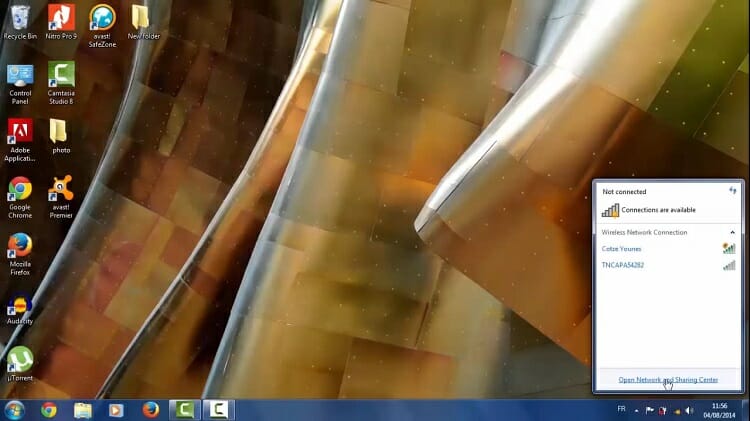
Step 1: Let’s start with computer1. Click on the network sign that exists in the right-below corner of your screen. There you will find Open Network and Sharing Center; click on it. You can also go to this location in another method. Open your control panel and then Network and Internet < Network and Sharing Center.
Step 2: Click on Set up a new connection or network.
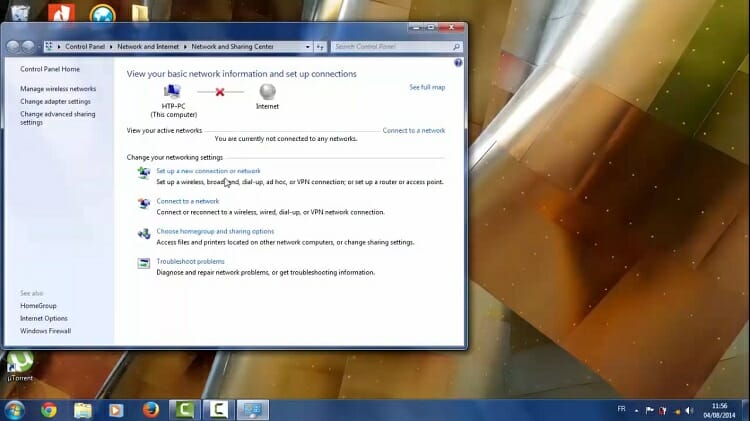
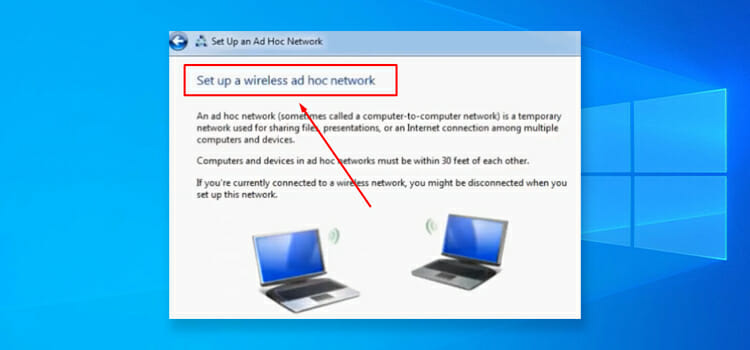
Step 3: Now hit the Set up a wireless ad hoc (computer-to-computer) network option and then Next. (Note: the windows 10 users won’t find this option at all; choosing Manually connect to a wireless network will serve the same purpose).
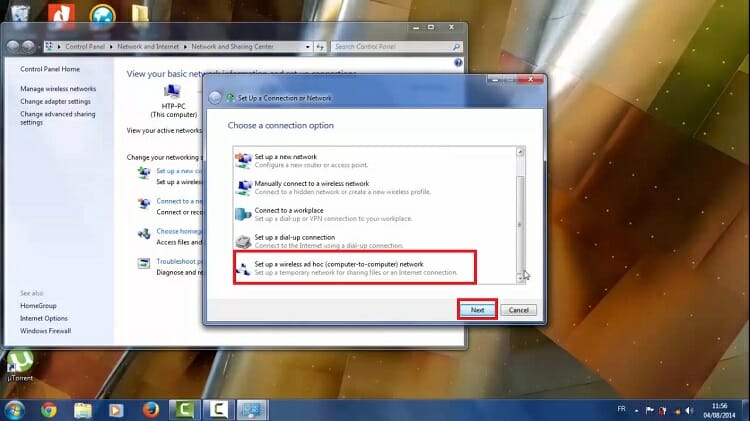
Step 4: You will direct to an introductory window of an ad hoc network. It says to make sure that computers remain within 30 feet of each other. Just click on Next.
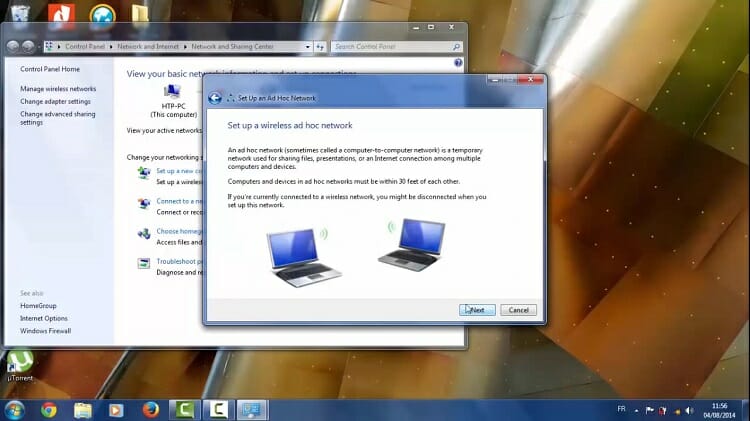
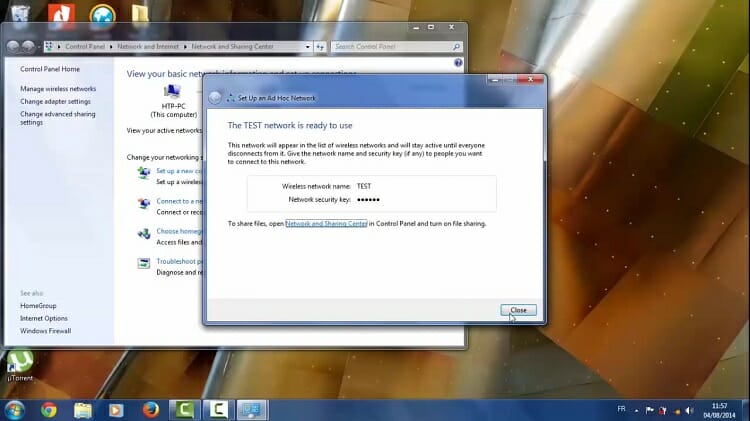
Step 5: Now a new dialogue box will appear which you have to use for naming the network and for setting up a password. Name anything you wish; here the network name is given as ‘Test’. Choose the security type as WPA2-Personal. Give a security key containing at least 8 characters. You can right check the box for saving this network or leave it as it is. Then click on Next.
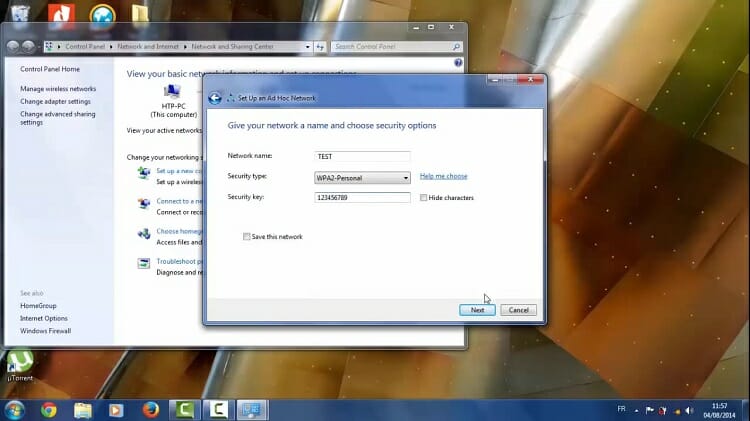
Step 6: The computer will set up the network in a few seconds and will be ready to use. Close the appeared box.
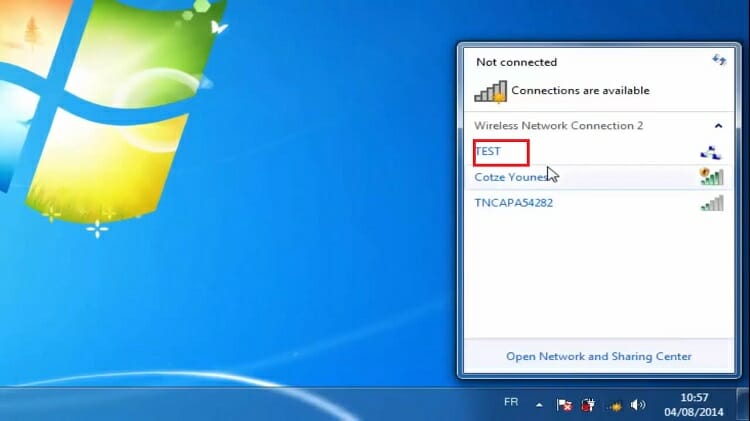
Step 7: Now take the computer2. Click on the network button right below to computer2 screen. Here you should find a number of available networks; our created Test ad-hoc network from computer1 is also available (You will find the network whatever you named it). Click on it.
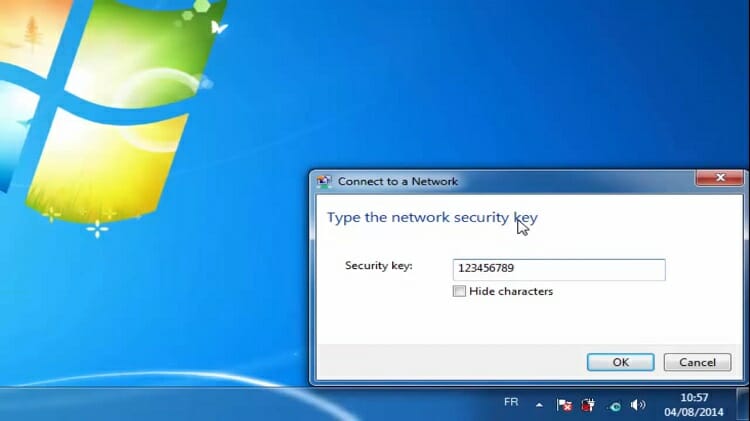
Step 8: Input the exact security key which was given when creating the ad-hoc network on computer1. Hit the OK button. As a result, computer2 is connected with computer1. But the job is not done yet; we have to set up a few more things for seamless sharing.
Step 9: Go back to computer1. Click on the created network which appears with a network sign.
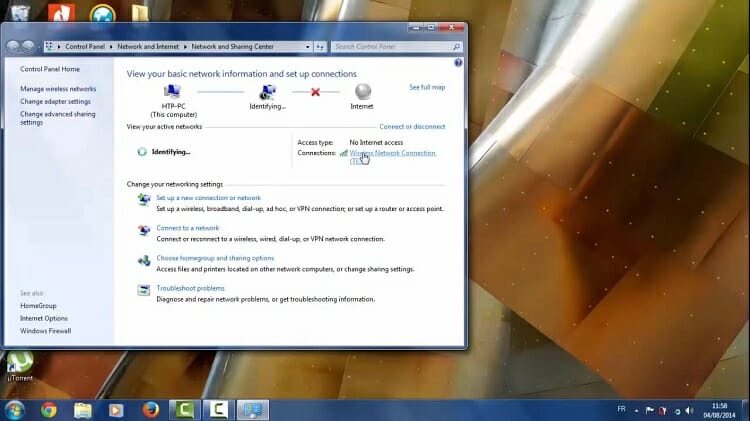
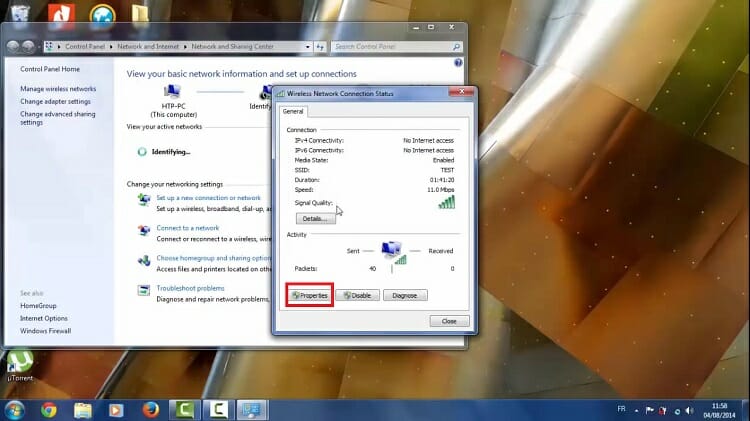
Step 10: A new dialogue box pops up; find the Properties option at the left-below of the box.
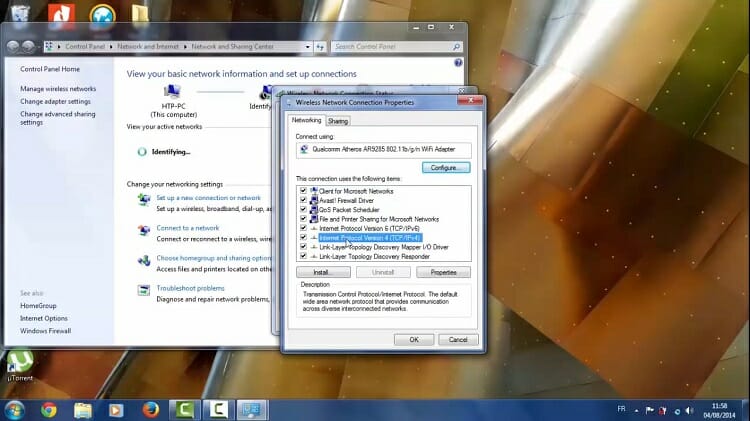
Step 11: Under the Networking tab, a number of items can be seen; every item is right checked box by default. Find the ‘Internet Protocol Version 4’ of TCP/ IP. Click on it and then OK so that we can edit a few things in the protocol.
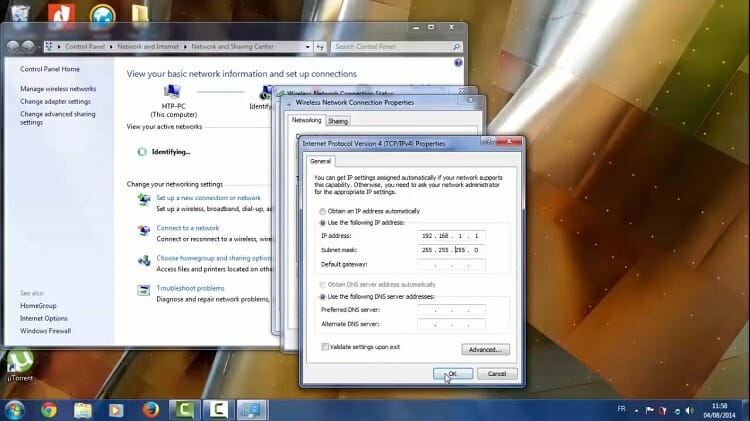
Step 12: Put in the IP address 192.168.1.1 and subnet mask with the number 255.255.255.0 and then hit the OK button.
Step 13: Go back to computer2 and set up the IP address similar to computer1. That means, Repeat steps no. 9, 10, 11, and 12 on computer2.
Step 14: Again, on computer1, select the Home Group option, left below to the screen.
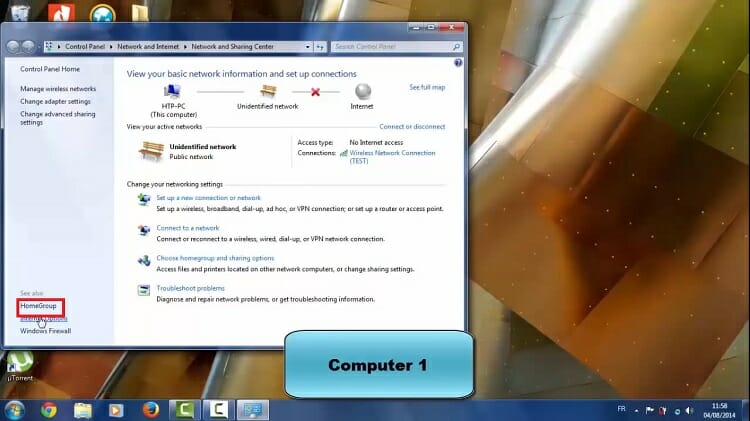
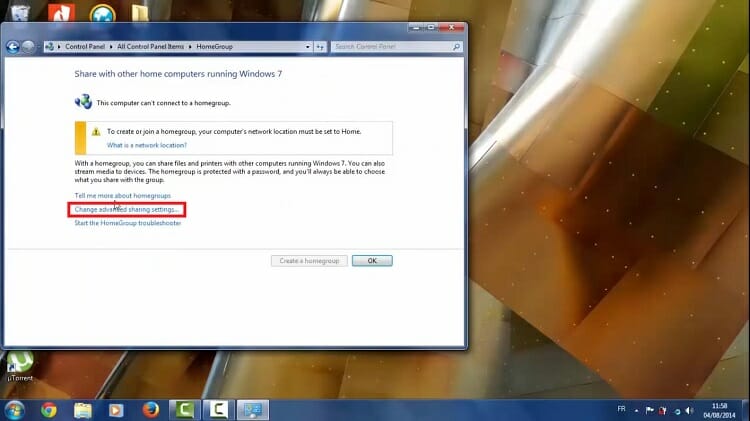
Step 15: Choose the Change advanced sharing settings option.
Step 16: Turn on sharing; use 128-bit encryption and turn off password-protected sharing. Save the changes.
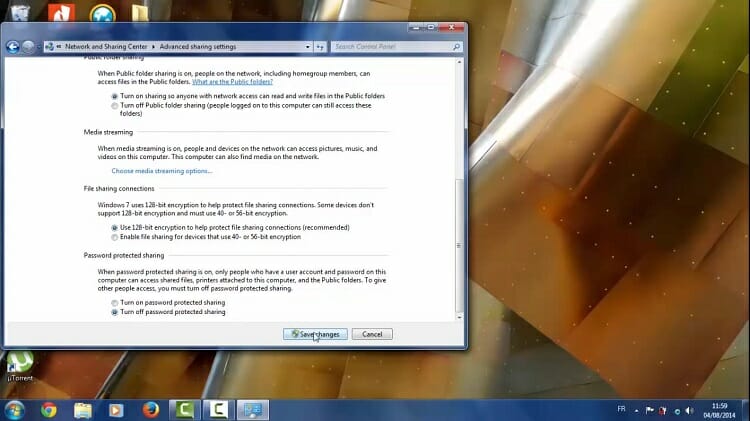
Step 17: Repeat steps 14, 15, 16 on computer2. The setup is completed on both computers. Now the computers are ready to share songs, videos, large files, and folders.
Step 18: Now, we will send a folder from computer1 to computer2. Let’s assume it is a music folder. We need to make some changes in the property of the folder so that it becomes sharable.
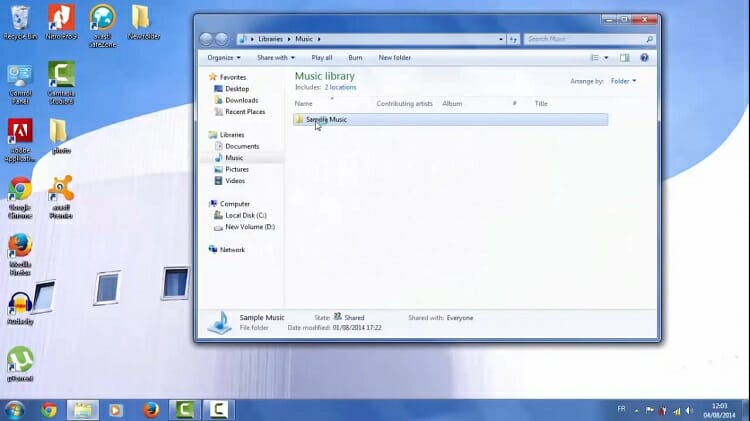
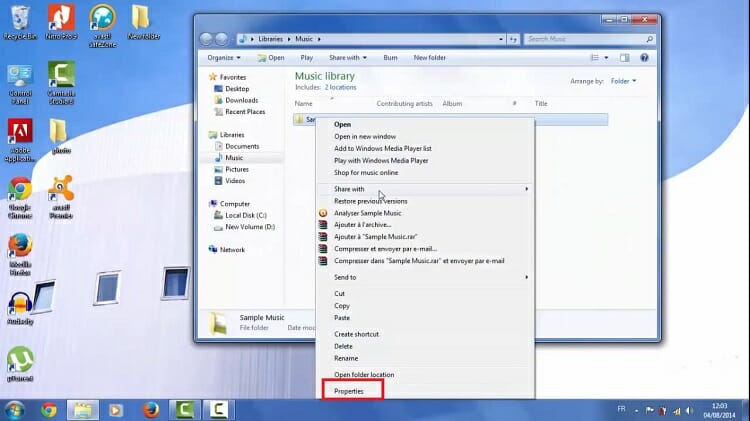
Step 19: After selecting the folder, right-click on the mouse and select properties.
Step 20: Under sharing tab, you should find that the connected PC name is visible; in this case HTTP-PC. Don’t share it right now because we still have some changes to make. Select the Advanced Sharing option.
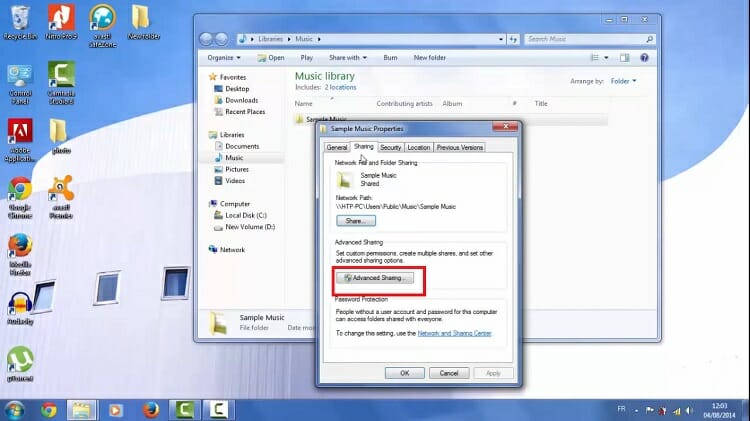
Step 21: Right check box Share the folder and then hit the Permissions.
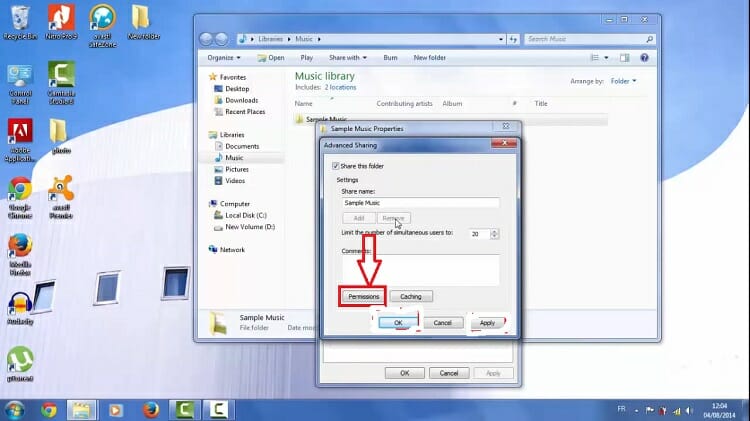
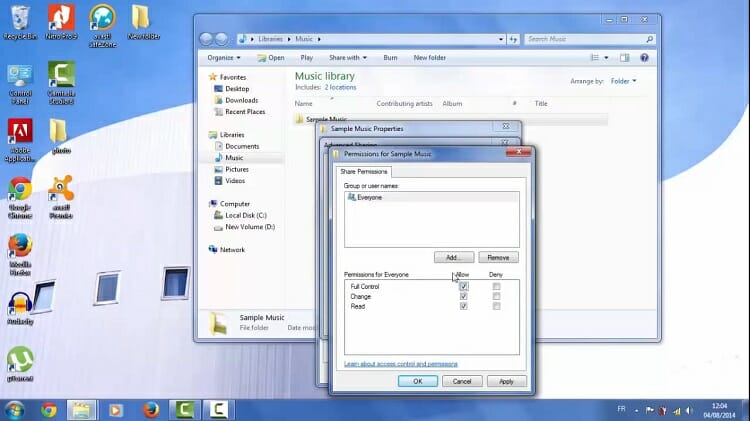
Step 22: Provide full permissions and allow for change and read. After that hit, all the Apply and OK buttons appeared one after another. That’s how we are able to send the folder to the destination computer.
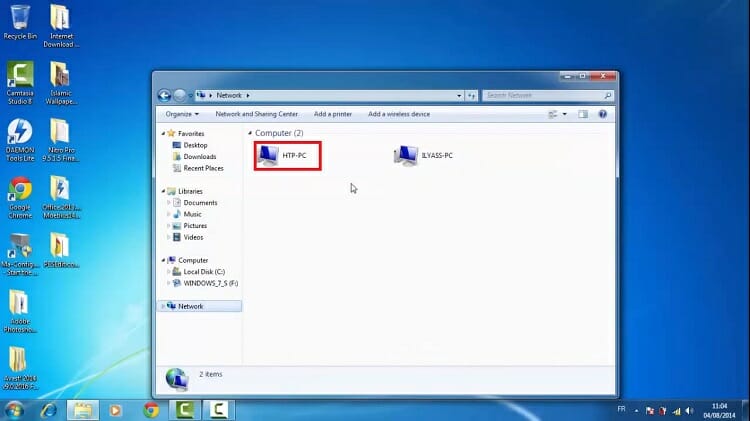
Step 23: Let’s search whether or not the folder can be found on computer2. Go to My computer and then to Network.
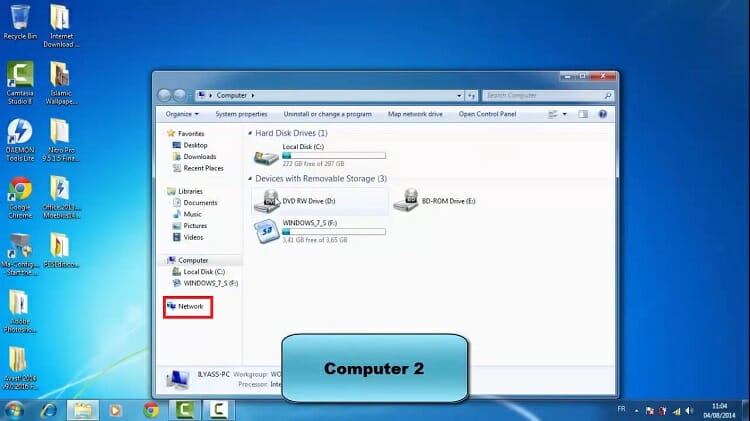
Step 24: Look for the connected device and click on it.
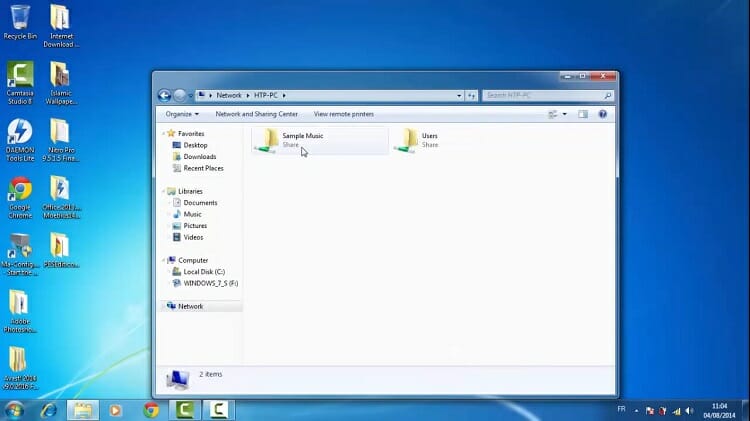
Step 25: Here is the Sample Music folder as you can see it from the figure.
Thus two computers were successfully connected and were able to share files. You can share more documents, files, and folders in a similar manner. You also can create a wireless connection with other computers and laptops by following the steps mentioned above.
Conclusion
The temporary ad-hoc networking is a great way to connect computers and laptops without any cable and internet data. The advantages of sharing files between computers are numerous and tremendous. Follow the steps carefully so that any error would not occur. Bluetooth and hotspot Wi-Fi-based sharing apps are also other ways for a wireless connection that you can try as well. After reading the whole article, we hope, now you know how you can connect two computers wirelessly.
Subscribe to our newsletter
& plug into
the world of technology